The Full Automation Stack: Overview Diagram
How I wired 5 layers of AI infrastructure into one working system — and how you can start with Claude Desktop today.
Most teams adopt AI tools one by one — a chatbot here, an API call there. This article maps out what a complete, production-grade AI automation stack actually looks like, layer by layer, and how InAgentic's MCP and AI solutions connect them into a coherent whole.
There's a significant difference between using AI and running AI. Using AI means prompting a model and copying the output. Running AI means building a system where models reason, take actions, call tools, handle errors, and produce business outcomes — reliably, at scale, without a human in the loop for every step.
The gap between those two things is the stack. Here's what it looks like.
The Overview Diagram
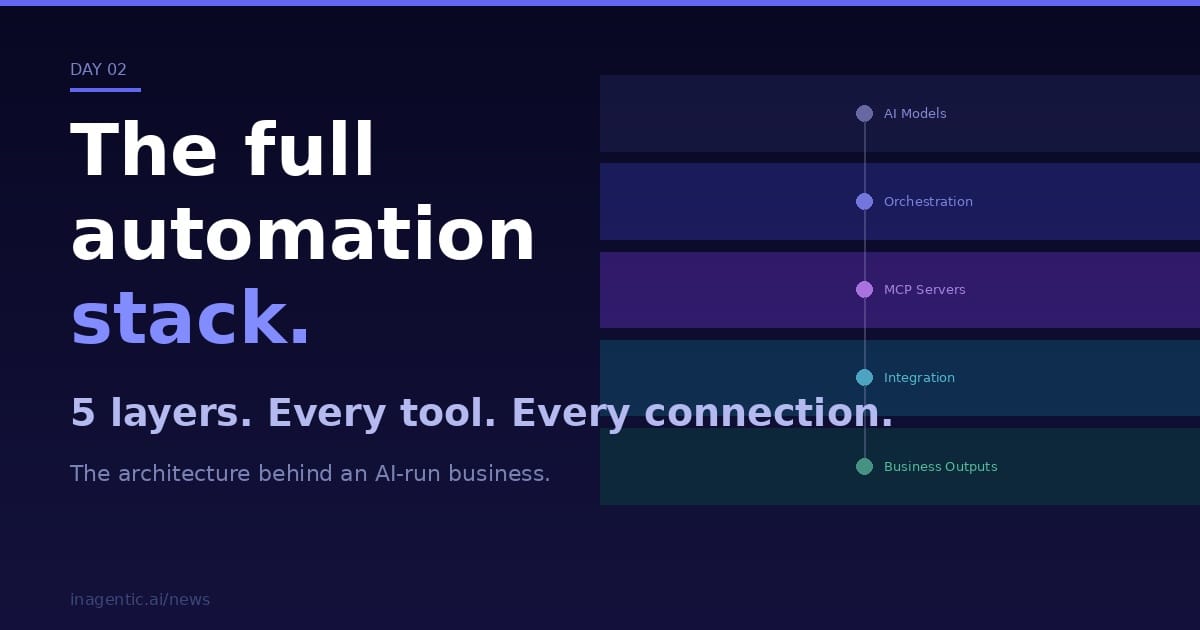
The diagram below shows the five layers of a complete AI automation stack. Each layer has a specific job. Together, they take a business goal and turn it into a completed outcome.
Served via AWS Bedrock (eu-west-1) · Anthropic API · prompt caching enabled
Multi-step reasoning · state management · observability · human-in-the-loop gates
Model Context Protocol · runtime tool discovery · session-aware · service-to-service auth
DTO validation · tenant isolation · audit logging · structured responses
Draft-only for critical filings · user confirms irreversible actions · full traceability
Layer 1: AI Models
At the top of the stack sit the language models themselves. InAgentic runs on the Claude family via AWS Bedrock in eu-west-1, which gives us GDPR-compliant European data residency without sacrificing model capability.
Model selection is task-specific. Opus handles complex reasoning and long-context work. Sonnet covers the majority of production workflows — it's fast, cheap, and capable. Haiku handles lightweight classification, routing, and high-frequency calls where latency matters.
Prompt caching is enabled across all tiers. For agents working with large, stable system prompts or shared context (company profiles, regulatory frameworks, filing templates), caching cuts both cost and latency significantly — typically 80–90% on repeated context.
Layer 2: Orchestration
A single model call is not an agent. An agent is a process — it reasons about a goal, decides which tools to call, interprets results, handles errors, and loops until the task is done or hands off to a human.
LangGraph provides the workflow engine. It defines the state machine: what nodes exist, what decisions branch to where, how state flows between steps, and when to pause for human approval. It handles retries, conditional routing, and parallel branches natively.
LangChain provides the tool-calling primitives — how the model selects and invokes tools, how retrieval-augmented generation (RAG) is integrated, and how multi-model chains are composed.
LangSmith provides observability. Every agent run produces a full trace: which model was called, with what inputs, what it returned, how long it took, what it cost. When something goes wrong in production, LangSmith is where you find out why.
Not ready to deploy the full stack yet?
You can use Claude Desktop as your orchestration layer to get started quickly. It handles the agent coordination without any cloud setup — a practical first step before moving to LangGraph and Bedrock.
Layer 3: MCP Servers
This is the layer most teams underestimate. MCP — the Model Context Protocol — is what turns a capable model into a useful agent. It defines a standard way for AI models to discover and call tools at runtime, without needing a developer to hardcode every integration.
InAgentic maintains several MCP servers:
- InAgentic MCP — core business logic, user context, and workspace operations
- FileDone MCP — UK Companies House filings, deadlines, and compliance data
- GitHub MCP — repository operations, PR management, content publishing
- Google Workspace MCPs — Gmail, Calendar, and Drive for communication and document workflows
Each server exposes a structured list of tools with descriptions the model can read at runtime. The model decides which tools are relevant for the current task. This means the same orchestration layer can serve many different workflows — the agent assembles the right toolset dynamically rather than executing a fixed script.
MCP servers handle authentication (service-to-service tokens with tenant context), error formatting, and rate limiting so the orchestration layer doesn't have to know about the quirks of each underlying API.
Layer 4: Integration Layer
MCP servers sit in front of the actual systems — REST APIs, databases, third-party platforms. The integration layer is where the data lives and where the mutations happen.
Key design rules here:
- Tenant isolation is enforced at the database layer, never trusted from the client. Every table carries a
tenant_idand queries always filter by it. - DTO validation runs on every inbound payload before it touches business logic.
- Audit logging captures every significant state change with a correlation ID that traces back to the originating agent run.
- PostgreSQL only. No NoSQL, no document stores, no event sourcing complexity for the core data model.
Layer 5: Business Outputs
The bottom of the stack is where work actually gets done: documents filed, reports drafted, emails sent, articles published, alerts raised.
One principle governs this layer across everything InAgentic builds: AI is assistive, not authoritative. For reversible, low-stakes outputs (a draft email, a blog article, a summary report), the agent completes the action autonomously. For irreversible or high-stakes outputs (a regulatory filing, a financial instruction, a deletion), the agent produces a draft and halts. The human confirms before the action executes.
This isn't a technical limitation — it's a deliberate design constraint. The value of automation is not removing human judgment; it's removing human effort from the work that doesn't require judgment so that humans can focus on the work that does.
How It Connects
A typical workflow traverses all five layers:
- A trigger fires (a deadline approaches, a document arrives, a user request comes in)
- LangGraph starts a workflow run and initialises state
- The model (via LangChain) receives the goal and the available MCP tools
- It calls the relevant MCP server — say, the FileDone MCP to fetch a company's filing history
- The MCP server queries the Companies House API via the integration layer
- Results flow back up: the model reasons over them, produces a draft filing, and flags it for human review
- LangSmith captures the full trace; the audit log records the draft creation
- The user reviews and confirms; the filing is submitted
Each layer does one job. None of them overlap. This is what makes the system maintainable as it scales — you can swap out an MCP server, upgrade a model, or add a new integration without touching the other layers.
Why This Architecture Matters
Most AI projects fail not because the model isn't good enough, but because there's no architecture around it. A model that can't reliably call tools, can't be observed when it fails, and can't be constrained from taking irreversible actions is not a production system — it's a demo.
The stack described here is what separates AI that saves hours per week from AI that causes incidents. Build the layers deliberately, keep them separate, and instrument everything. The model is the least interesting part of the problem.
Summary — Full Automation Stack
- ✓Using AI ≠ running AI — prompting a model is using it; a system that reasons, calls tools, and handles errors without hand-holding is running it
- ✓Production AI stacks have 5 layers, each with one job: Models → Orchestration → MCP Servers → Integration → Business Outputs
- ✓Model choice should match the task: Opus for complex reasoning, Sonnet for most production work, Haiku for fast/cheap classification
- ✓Prompt caching cuts cost and latency 80–90% on repeated context (system prompts, templates)
- ✓MCP's real value is dynamic tool discovery — one orchestration layer can serve many workflows without hardcoding each integration
- ✓Tenant isolation belongs at the database layer (every table, every query filtered by
tenant_id), never trusted from the client - ✓Governing principle: AI is assistive, not authoritative — low-stakes actions run autonomously, irreversible ones (filings, payments, deletions) always stop for human confirmation
- ✓Most AI projects fail from missing architecture, not weak models — clean layer separation is what makes a system scale and stay maintainable
- ✓You don't need the full stack to start — Claude Desktop alone works as a first orchestration layer