
Book Me In From a Chat: A White-Label Booking Assistant Backed by Google Calendar
Book Me In From a Chat: A White-Label Booking Assistant Backed by Google Calendar

3 July 2026•9 min read•Engineering
We added a free-text, chat-first booking flow — real Google Calendar availability, natural multi-turn slot-filling, and an email confirm/reschedule loop — to a brand-neutral page anyone can reuse.
The problem: booking is a conversation, not a form
Most booking widgets make you click through a calendar grid, pick a date, pick a time, then fill in a form. It works, but it's not how people actually ask for time — in a chat, a DM, or a text message, people just say "can you do 1pm Saturday?". Today we shipped a booking page that takes that sentence literally: type a request in plain English, and a chat assistant checks a real calendar, negotiates a time, collects your details, and gets a human to confirm — all without a single dropdown.
The page lives at inagentic.ai/booking, and it's deliberately built with zero branding so the same page and backend can be dropped in for a different business entirely.
Part 1: A page with nothing on it but the essentials
The whole point of /booking is that it doesn't look like it belongs to any one company. No logo, no navigation bar, no footer, no cookie banner — just three things, top to bottom:
- A calendar illustration
- Three steps explaining what happens next
- A chat box
The three steps
1. Book a timeslot (Hold for 24h)
2. Await callback to briefly discuss requirements (A few minutes)
3. We'll send you a confirmation email/payment link (Complete booking)
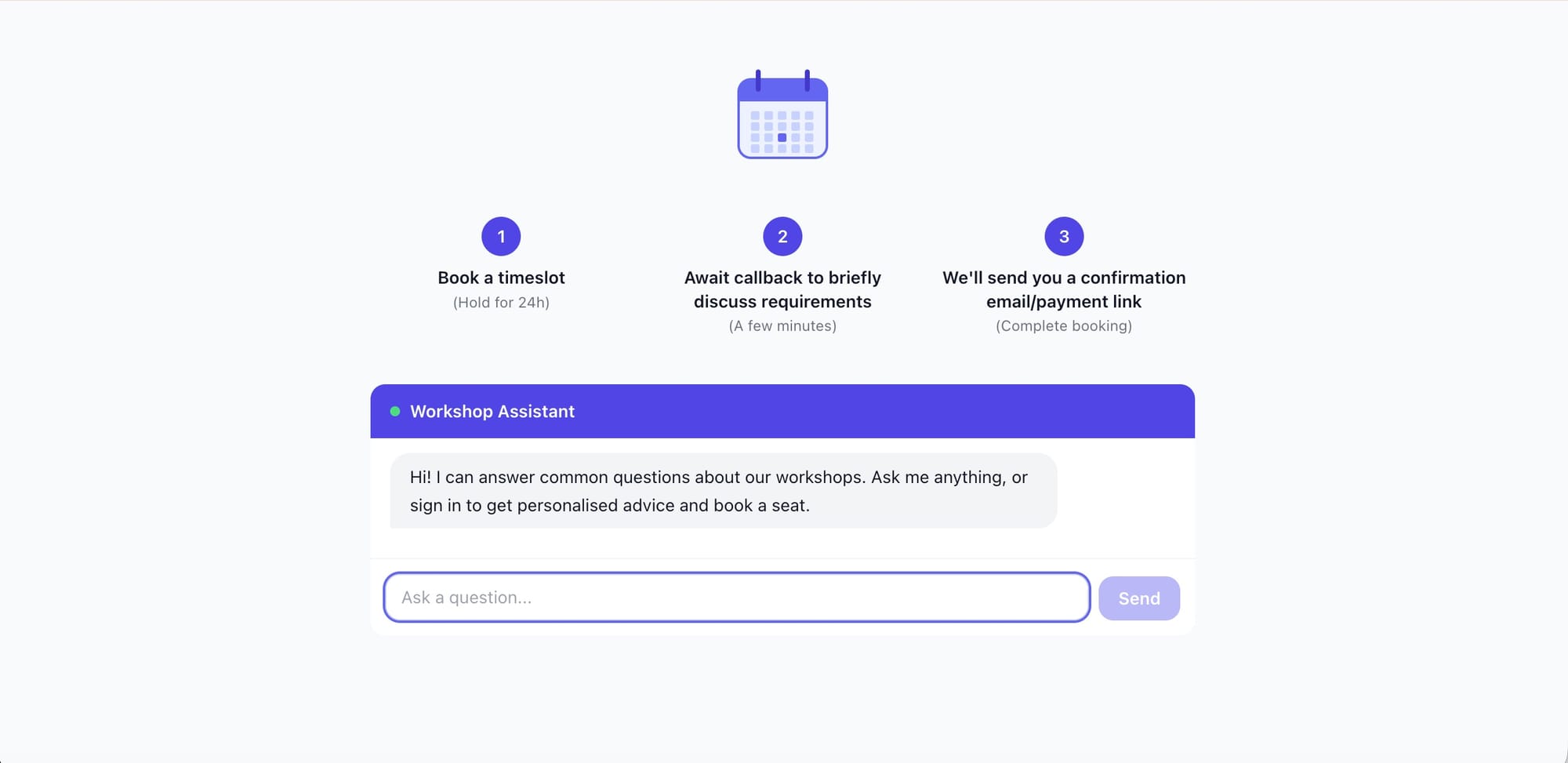
Every other page on this site runs through a shared root layout that always renders a header, footer, and cookie banner — reasonable for marketing pages, wrong for something meant to be embedded or reused as-is. Rather than fork the layout, we added a small route allowlist that the navigation and footer components check before rendering anything, so /booking (and only /booking) renders with genuinely nothing around it. Any future white-label page can opt into the same treatment with one line.
Part 2: reusing the assistant that already existed
We didn't build a new chatbot for this. The site already runs a Claude-powered assistant (via AWS Bedrock) inside a chat widget used for workshop Q&A and checkout — it uses Anthropic's tool-use pattern, where the model can call defined functions (check seat availability, create a Stripe checkout session) mid-conversation and keep talking once it has the result. The booking page reuses that exact widget and backend, just with two new tools bolted onto the same tool-use loop:
check_calendar_availability— given a proposed start/end time, checks whether it's freerequest_booking— once a slot is confirmed free and contact details are collected, creates the booking and kicks off the confirmation email
That's the entire integration surface. The model decides when to call them based on a short addition to its system prompt describing the flow — no new conversation engine, no separate booking-specific chatbot to maintain.
The calendar check is a real one
Until today, this site had no Google Calendar integration at all — only Gmail, used for an internal dashboard's inbox digest. We added a second, separate OAuth connection using the same Google API credentials but a different scope (calendar instead of gmail.readonly), stored against its own refresh token. Once connected, the assistant calls Google's freebusy API to check a proposed slot against the real calendar — no double-booking, no stale availability data.
Part 3: the conversation, step by step
Here's what a booking actually looks like from the user's side:
You:       dog walk 1pm Saturday
Assistant: Who needs a walk Saturday 4 July 1pm?
You:       Snoopy
Assistant: What's your name, phone and email?
You:       Charlie Brown, 07700 900123, charlie@example.com
Assistant: Snoopy has been booked 4 July 1pm.
Behind that last line, the assistant has already checked the calendar, created a pending booking, and emailed the business owner a Confirm / Reschedule choice — but the customer doesn't need to know that part is still in flight. From their side, it's booked.
What happens on the owner's side
The owner gets an email with the request and two buttons: Confirm or Suggest reschedule. This mirrors a pattern we already use elsewhere on the platform for human-in-the-loop approvals — a single-use, token-secured link that requires no login, just a click.
- Confirm — the slot is added to the real calendar as an event, and the customer gets a "you're booked" email.
- Suggest reschedule — the assistant recomputes availability and emails the customer up to five alternative times: same day first, business hours (9am–5pm, every day including weekends), spilling into the following days only if fewer than five slots are free on the original day.
Whichever alternative the customer clicks books immediately — no second approval loop. The five options offered were already vetted as free on the owner's calendar, so there's nothing left to approve; making the customer wait on a second round-trip would just add friction for no benefit.
Guarding against double-booking
Two people could plausibly click the same email link at the same moment, or a slot in a reschedule email could get taken by something else between the email being sent and being clicked. Both are handled the boring, correct way: every state change happens as a single atomic database update guarded by the booking's current status (e.g. "only confirm if still pending"), and slot links are re-checked against the live calendar the instant they're clicked, not just when the email was generated. Either race loses cleanly — the second click sees "already booked," not a duplicate calendar event.
Part 4: why this is genuinely reusable
Three design choices make this more than a one-off feature for this business:
- No branding on the page itself — anyone can point a different domain at the same route and it looks like it belongs to them.
- The booking logic doesn't know what it's booking — "title" is a free-text field the assistant fills in from the conversation. A dog walk, a haircut, a sales call, a consultation slot — the backend doesn't care.
- One calendar, one owner, zero new infrastructure per client — connecting a new business just means a new Google Calendar OAuth grant, not a new database, deployment, or codebase.
Quick reference
Page:        inagentic.ai/booking  (no header, footer, or cookie banner)
Assistant:   same Claude/Bedrock chat used for workshop Q&A, +2 tools
New tools:   check_calendar_availability, request_booking
Calendar:    Google Calendar freebusy + event creation (new OAuth scope)
Owner email: Confirm / Suggest reschedule (single-use token link)
Reschedule:  up to 5 alternatives, same-day first, 9am-5pm, 7 days/week
Booking:     immediate once a valid alternative is picked, no 2nd approval
Frequently Asked Questions
Does the customer need to sign in to book?
The chat widget already gates booking-style requests behind a lightweight magic-link sign-in (the same gate used for course Q&A), mainly to keep the flow spam-resistant. Everything after that — the actual conversation — is plain chat.
What happens if the requested time is already busy?
The assistant tells the user directly and asks for another time, rather than silently proposing alternatives it hasn't been asked for.
Can this be reused for a business that isn't a workshop or course provider?
Yes — that's the point. The booking backend has no concept of "workshop"; it takes a title, a time, and contact details. The page itself carries no branding, so the same URL pattern and components can front a completely different business.
Why email links instead of a dashboard for the owner to manage bookings from?
Because it needs zero setup and zero login for a one-off decision. A dashboard is the right tool once booking volume justifies building one — a single-use link in an email is the right tool for "decide on this one thing right now."
What stops someone from re-using an old confirm or reschedule link?
Every link is checked against the booking's current status before anything happens, and that check-and-update is a single atomic operation. Once a booking has moved on from the state a link expects, that link stops working — cleanly, with no partial effects.
check_calendar_availability and request_booking as the entire integration surface — no new conversation engine, no separate booking-specific chatbot to maintain.Same assistant, two new tools, one real calendar — and a page with nothing on it that isn't load-bearing.