
Agent 1: lead qualification - how it works
Your inbox is not a to-do-list. Probably a mix of warm prospects, noise, platform notifications, and things you should have acted on days ago. All in the same place looking roughly the same. That is the problem the lead qualification agent solves.
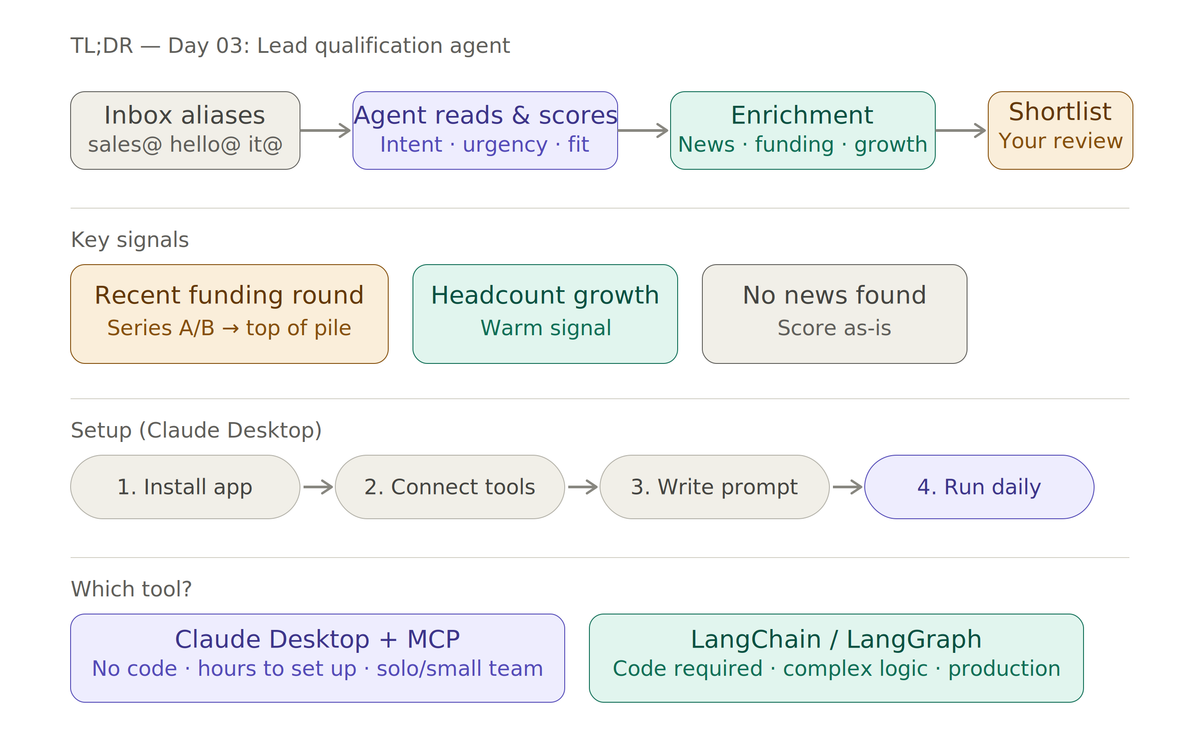
Day 03 — Agent 1: Lead Qualification
Every business is different, but the way leads arrive tends to follow a familiar pattern. A Gumroad product sale, a LinkedIn message, a contact form submission, a newsletter signup — they all end up in your inbox sooner or later. The channel varies; the destination doesn't.
The problem isn't volume. It's noise. When everything lands in one place, it becomes genuinely difficult to distinguish a warm prospect from a cold inquiry, or a high-value lead from someone who'll never convert. That's the problem Agent 1 is designed to solve.
Start with your inbox architecture
Before any AI can help you, you need some basic structure in place. My first recommendation is simple: create multiple email addresses or aliases mapped to different parts of your business. Something like sales@, product@, accounts@, it@, and hello@ will do the job. Each alias acts as a signal. When a lead comes in through sales@, the context is already different from something arriving through hello@. You've sorted the post before you've even opened it.
This takes about ten minutes to set up and makes everything downstream considerably cleaner.
Where the agent comes in
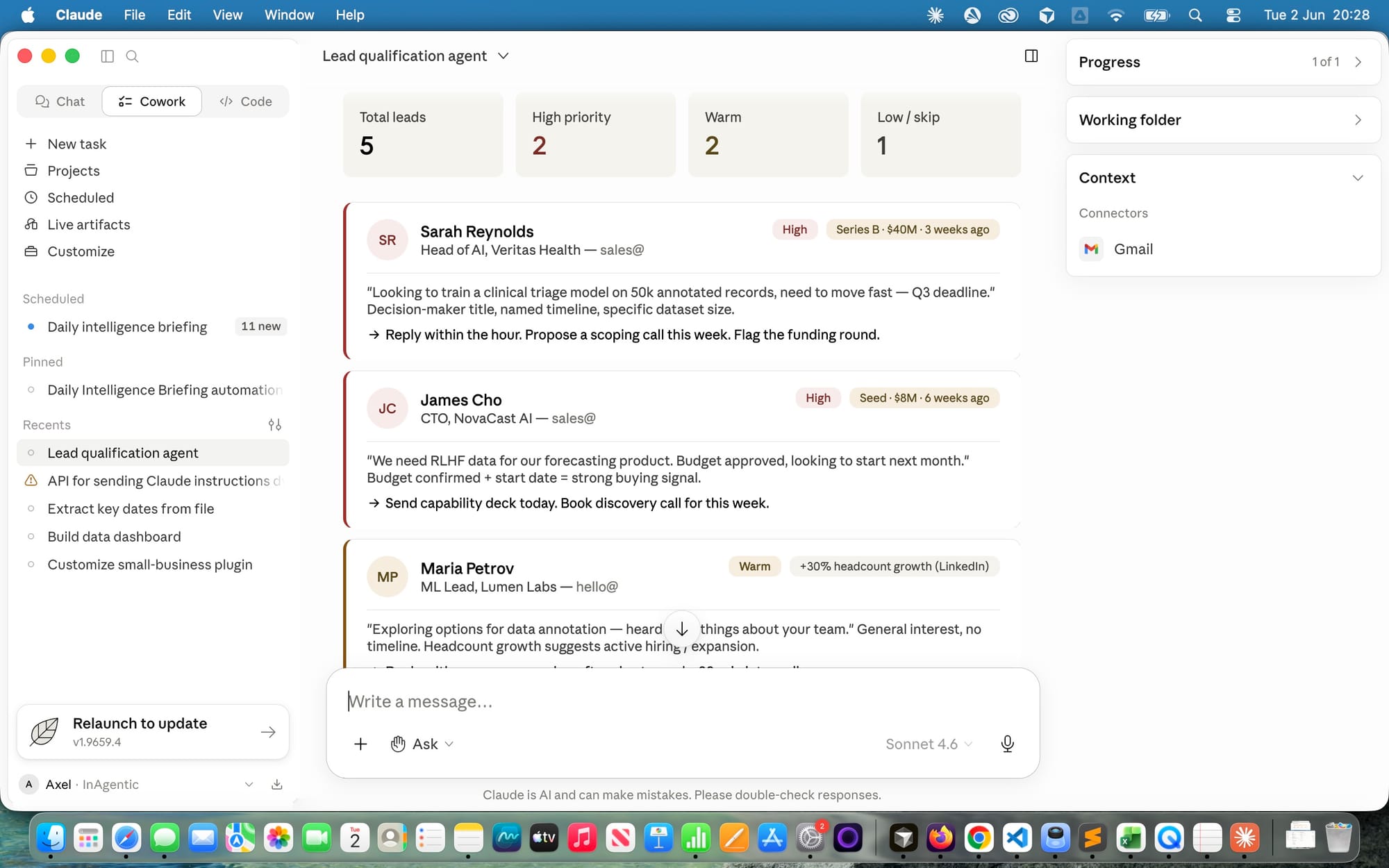
Once your inbox has some structure, the agent starts doing the interesting work. It reads incoming messages, scores them by intent and urgency, and surfaces the ones that actually warrant your attention. Low-signal enquiries get flagged for later or routed to a template response. High-signal leads get escalated immediately.
But the real leverage comes from enrichment. The agent doesn't just read what's in your inbox — it goes looking for context. Company news, recent funding announcements, headcount changes, new product launches. Anything that tells you whether this is a good moment to be speaking to this particular person at this particular company.
Why investment rounds change everything
In my line of work, funding announcements are one of the most reliable buying signals there is. A company that has just closed a Series A or Series B has budget, momentum, and a mandate to move fast. They're not in planning mode — they're in execution mode. That's exactly when they need what I offer.
The agent monitors for this automatically. When a lead comes in and there's a recent funding round attached to that company, it moves to the top of the pile. Not because I told it to every time, but because I built that logic in once and it runs quietly in the background.
Setting this up in Claude Desktop
Claude Desktop is the quickest way to get an agent like this running without writing any infrastructure code. It connects to your tools through MCP — Model Context Protocol — a standardised way for Claude to talk to external services like Gmail, Google Drive, or a CRM.
Step 1 — Install Claude Desktop from anthropic.com. This is the native app, not the browser version.
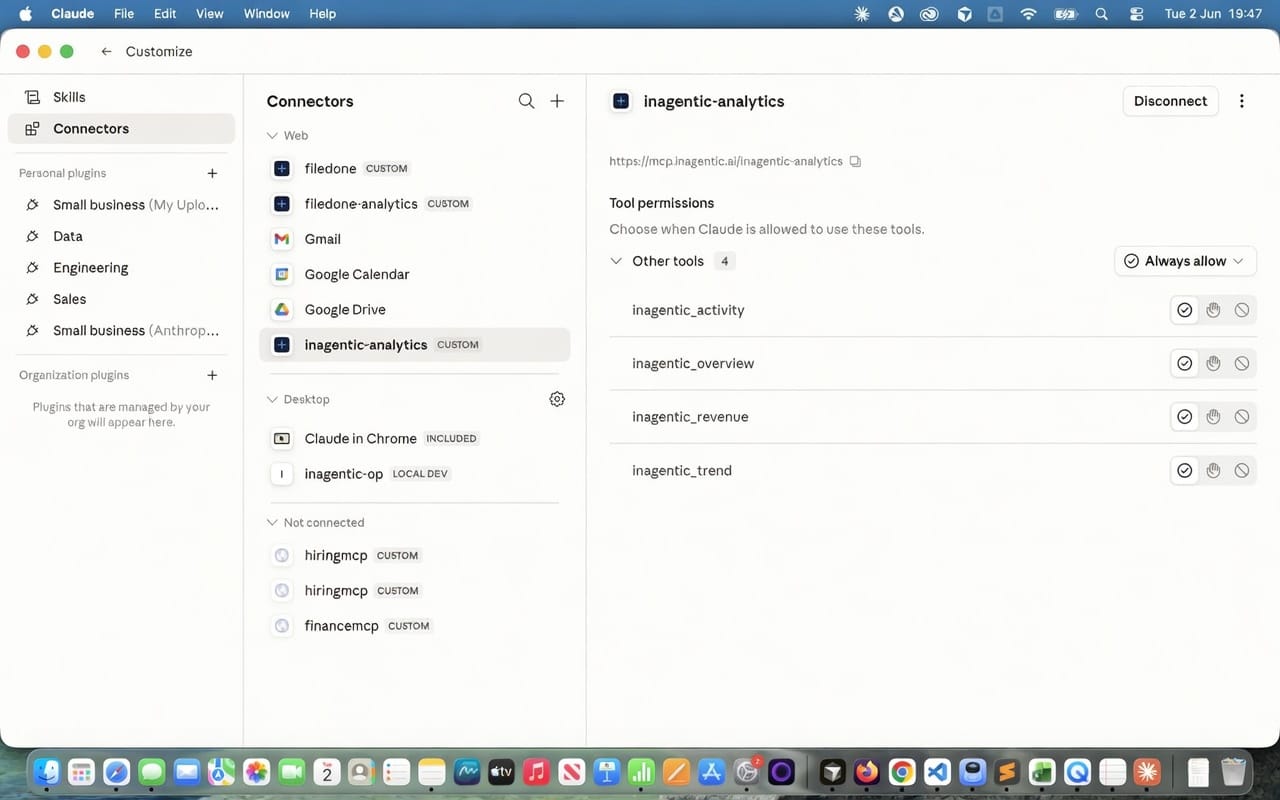
Step 2 — Connect your tools. Go to Settings and click Integrations. You'll see a list of available connectors — Gmail, Google Drive, Google Calendar, and others. Click Connect and authorise access when prompted. For custom or self-hosted MCP servers, add those in the same place — paste in the server URL and Claude connects to it the same way. No config files, no terminal, no JSON.
Step 3 — Write your system prompt. This is where you define the agent's behaviour: what to look for, how to score leads, what enrichment to pull, when to escalate. The example above shows exactly what mine looks like. A few things worth noting about how it's structured:
The prompt tells the agent which inboxes to read, how to score intent, what enrichment to look for, and crucially — that any company with a recent funding round goes straight to the top of the list. That last rule alone makes the whole thing worthwhile.
You can write this directly into the system prompt text box in Claude's settings, or keep it in a lead-agent.md file on your machine and paste the contents in. The markdown file approach is worth it once the prompt gets longer than a few paragraphs — it means you can version control your agent instructions the same way you'd version control code, and iterate on them without losing previous versions.
A simple lead-agent.md might look like this:
markdown
# Lead qualification agent

## Role
You qualify and prioritise inbound leads for an AI training business.

## Inboxes to read
- sales@ — direct purchase intent
- hello@ — general enquiries

## Scoring
- High: specific ask, named timeline, or decision-maker title
- Warm: general interest, exploring options
- Low: no clear intent, wrong fit

## Enrichment
Search for recent news on each sender's company:
- Funding rounds in the last 90 days → top priority
- Headcount growth → warm signal
- No news found → score as-is

## Output format
For each lead worth acting on: name, company, source alias,
intent score, funding/news signal, suggested next action.
Keep it in a /agents folder in your project directory. When you update your scoring logic or add a new signal to watch for, you update the file and paste the new version in. Simple, auditable, no surprises.
Step 4 — Run it conversationally to start. Open Claude Desktop in the morning, ask it to process overnight leads, and review what it surfaces. The agent reads the inbox, enriches company data in the background, and returns a prioritised shortlist with context already attached — as shown in the chat view above.
Once you're happy with the logic, you can look at automating the trigger. But the manual version is a perfectly good starting point. The whole setup can realistically be done in under an hour.
Step 5 — Create daily-briefing and merge data through connections Claude Desktop allows you to simply connect to additional servers providing data and two way integrations, ask it to process company specific data, and review what it surfaces.
| Date | Company | Raised | Round | Sector | Location |
|---|---|---|---|---|---|
| 01 Jun | Inherent | £37,180,000 | Growth | Biotech | London |
| 01 Jun | Laverock Therapeutics | £2,200,000 | Grant | Biotech | London |
| 01 Jun | Circular11 | £2,400,000 | Seed | Construction | Dorset |
| 01 Jun | Edify | £3,000,000 | Seed | Edtech | London |
| 01 Jun | Handshake | £2,400,000 | Seed | Supply Chain | London |
| 01 Jun | Lune & Wild | £2,000,000 | Seed | Foodtech | London |
Claude Desktop vs LangChain and LangGraph — what's the actual difference?
This comes up a lot, so it's worth being direct about it.
Claude Desktop with MCP is an application layer. You're using a ready-built interface, connecting pre-built tool integrations, and writing prompts. There's no code. It's fast to start, easy to adjust, and you can see exactly what the agent is doing in the conversation window. The constraint is that you're working within what the app supports — you can't build custom logic, branch on conditions, or chain agents together in complex ways.
LangChain and LangGraph are developer frameworks. You're writing Python or JavaScript, defining your own chains, managing state explicitly, and building workflows that can be as complex as you need. LangGraph in particular is designed for multi-agent systems where agents hand off to each other, loop back on themselves, or make decisions about which path to take next. Genuinely powerful — but you're writing software, not prompts.
| Claude Desktop + MCP | LangChain / LangGraph | |
|---|---|---|
| Setup time | Hours | Days to weeks |
| Requires coding | No | Yes |
| Custom logic & branching | Limited | Full control |
| Multi-agent orchestration | Basic | Native |
| Debugging | Conversation window | Code logs, traces |
| Best for | Proving the concept, solo operators | Production systems, complex workflows |
My approach for this build has been to start in Claude Desktop — get the logic right, understand what the agent actually needs to do, and validate that it's producing useful output. Once that's solid, anything that needs to run automatically or handle real complexity moves to code.
There's no prize for going straight to LangGraph if a well-prompted Claude Desktop agent does the job. But there's also no point trying to force Claude Desktop to do something it isn't built for. Know which tool you're reaching for and why.
For lead qualification at the stage most solo operators and small teams are at, Claude Desktop gets you 80% of the value with 20% of the effort. That's a reasonable trade.